Every document, handled.
HearthScan is the document desk of your home. Scan from a real scanner, from your phone's browser, or drop in existing files: everything flows into one place, gets straightened, cleaned, read and named, and stays on your own computers. No cloud, no account.
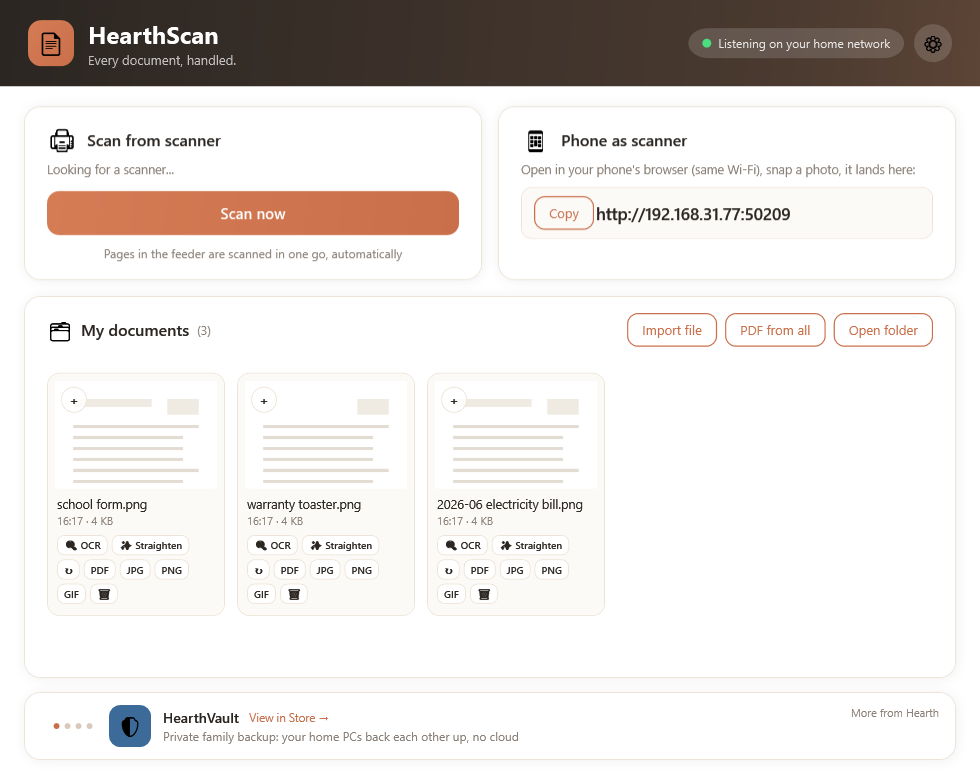
Three ways in. One smart pipeline.
However a paper enters your life, it ends up in the same tidy place.
Your real scanner
Works with the scanner you already own. Load the feeder and every page is scanned in one go, automatically, straight into your documents.
Your phone's camera
HearthScan shows a local address. Open it in the phone's browser (same Wi-Fi), snap the paper, and it lands on your PC instantly. No phone app to install, so it works on every phone in the family.
Files you already have
Drag in photos of receipts from your phone backups, old scans, screenshots. They join the same pipeline and get the same treatment.
It reads, straightens and names. So you don't.
Straighten & clean
A crooked photo of a newspaper becomes a flat, white, readable page: perspective fixed, tilt corrected, shadows evened out, edges trimmed. Like magic, except it's math.
It reads your documents
Built-in OCR runs locally and turns scans into searchable text, so a scan stops being a dumb picture. Your documents are read on your machine, never on someone's server.
Smart names, not IMG_2389
Instead of a folder full of mystery numbers, documents get names that mean something, so the electricity bill from March is findable next year when you actually need it.
Multi-page PDFs
Combine any scans into one PDF ("PDF from all"), or export single pages as PDF, JPG or PNG. Rotate, review and manage everything in a gallery that feels like 2026, not 2009.
One scanner for every PC
The scanner is plugged into the office PC, but you're on the laptop? Trigger the scan remotely and the page arrives at your desk, verified and encrypted, over your own network.
Speaks your language
The app itself comes in 18 languages, including full right-to-left Hebrew and Arabic layouts, because the document desk of the home should feel at home.
Questions people ask
The honest answers, before you download.
What is HearthScan?
HearthScan is a free document scanning app for Windows. It turns paper, phone photos and existing files into clean, readable, well-named documents that live only on your own PCs. Think of it as the document desk of your home.
How much does HearthScan cost?
It is completely free. You download it from the Microsoft Store, and there is no trial, no subscription and no paid tier hiding features behind a wall.
Does HearthScan need the internet, a cloud or an account?
No. There is no account to create and nothing is uploaded to a cloud. Scanning, reading (OCR) and naming all happen locally on your machine, and the app works fully offline.
Which version of Windows do I need?
HearthScan runs on Windows 10 and Windows 11.
How does scanning with my phone work, and do I need to install an app?
No app is needed. HearthScan shows a local web address; you open it in your phone's browser on the same Wi-Fi, snap the paper, and the photo lands on your PC. Because it is just a web page, it works on every phone in the family. The one requirement is that the phone and PC share the same home network.
Can I use my own scanner and share it with other PCs in the house?
Yes. HearthScan works with the scanner you already own, and it can trigger that scanner from another PC on your network. The page arrives at your desk verified and encrypted, so one scanner serves the whole house.
Does it really read and name documents on its own, and how accurate is it?
Built-in OCR reads your scans into searchable text and suggests meaningful names instead of IMG_2389. It works best on clear, well-lit pages, and you can always rename or straighten anything by hand before you file it.
Part of the Hearth family
HearthScan is completely free, and it's built on the same private home-network technology as HearthWire and HearthVault. Scans can reach any computer in the house, and your backups can keep them safe.