Deleted by mistake?
Bring it back.
HearthRescue recovers files you deleted from your PC, memory cards and USB drives. It reads the drive without ever writing to it, and it tells you the honest truth about what can, and cannot, come back.
Get it on the Microsoft Store Pay once, own it forever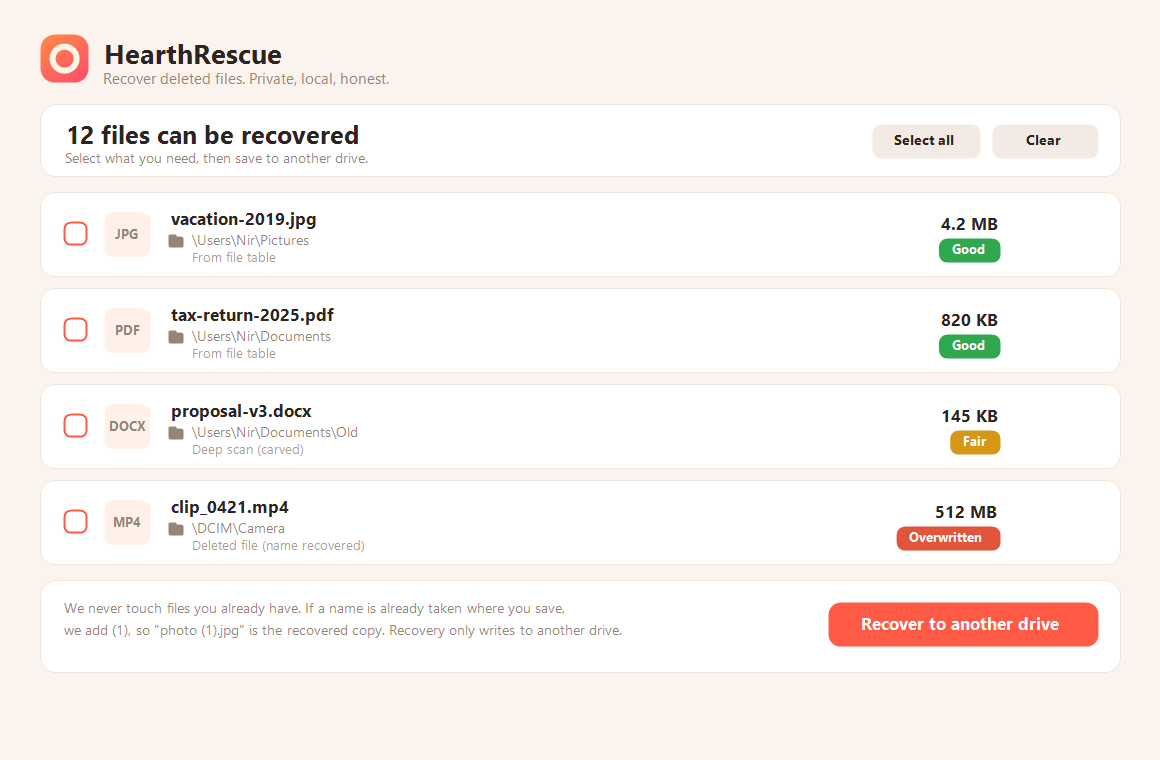
Most recovery tools promise the impossible. HearthRescue does not. Deleted data survives on the disk until something writes over it, and that is usually most of it, so we bring it back. But data that was physically overwritten is gone, and no tool can change that. Every file gets an honest label, Good, Fair, or Overwritten, so you always know what you are really getting. One tip that matters: the moment you realise you deleted something, stop using that drive, every new write lowers the chance.
Everything you need to get your files back
Hard drives and SSDs (NTFS), plus camera and phone cards and USB sticks (FAT and exFAT). A deep scan rebuilds photos and documents by their signature even after a format.
HearthRescue reads the drive's own records, so recovered files come back with their real names and folders, not "file0001". On cards it even re-matches names to the recovered data.
Lost files from Documents or your camera roll? Point HearthRescue at that folder with a single click instead of wading through the whole drive. Deleted the folder itself? Aim one level up and we look inside it.
The drive you recover from is opened read-only, we never write to it. You save recovered files to a different drive, so recovery can never overwrite what it is trying to save.
If a file with the same name already exists where you save, we keep yours untouched and save the recovered copy as "photo (1).jpg", so nothing you already have is ever replaced.
No account, no analytics, no cloud. Your files and even their names never leave your computer. Pay once and own it, no subscription.
The TRIM problem, and what we do about it
SSDs, memory cards and many newer hard drives use a feature called TRIM: when you delete a file, Windows tells the drive that the space is free, and the drive physically discards the data, often within minutes. After that, no recovery tool in the world can bring it back. Most tools will still show you the file names and happily "recover" empty, broken files without telling you. HearthRescue was built to handle TRIM differently:
Not sure whether your drive does this? HearthRescue checks for you: the TRIM protection screen asks each drive directly whether it uses TRIM, and can even run a live test that proves how fast your drive discards deleted data. Prefer to check by hand? Open Windows' "Defragment and Optimize Drives" tool: drives listed as "Solid state drive" use TRIM. Power users can open an Administrator command prompt and run fsutil behavior query disabledeletenotify: a value of 0 means Windows is sending TRIM to drives that support it.
For advanced users: TRIM only applies to NTFS and ReFS drives. FAT32 and exFAT do not use TRIM at all, so deleted data stays on that media until something overwrites it. This is exactly why memory cards, camera cards and USB sticks (almost always FAT32 or exFAT) are so recoverable, and why an internal SSD (NTFS) usually is not. Windows has no supported way to turn TRIM off for a single drive, the setting is system-wide, so the practical options are: recover fast, keep TRIM off, or keep important removable media formatted as exFAT.
HearthRescue verifies what it actually reads back. A file whose data was already discarded is reported as lost, honestly, instead of being saved as a broken fake "recovery". You will never have to guess why a recovered file will not open.
Just deleted something? The emergency mode saves every matching file the instant it is discovered, small and important files first, instead of making you sit through a full scan and pick from a list. Inside the TRIM window, every second counts.
One clearly explained, reversible switch tells Windows to stop discarding deleted data, so anything you delete from now on stays recoverable until it is truly overwritten. The app lays out the trade-offs and you decide.
Questions people ask
What is HearthRescue?
HearthRescue is a Windows app that recovers files you deleted from your PC, memory cards and USB drives. It reads the drive read-only, rebuilds files by their records or their signature, and gives every result an honest label so you know what can truly come back.
How much does it cost, and is there a subscription?
HearthRescue is a one-time purchase on the Microsoft Store. You pay once and own it forever, with no subscription and no recurring fees.
Does it need the internet, an account or the cloud?
No. HearthRescue is 100% local and needs no account and no internet connection. Your files, and even their names, never leave your computer.
Which version of Windows do I need?
HearthRescue runs on Windows 10 and Windows 11. It works with NTFS drives, plus FAT and exFAT cards and USB sticks.
What makes HearthRescue different from other recovery tools?
Honesty. Every file gets a Good, Fair or Overwritten label, and the app verifies what it actually reads back instead of saving empty, broken files as fake recoveries. You always know why a file will, or will not, open.
Can it recover files from an SSD?
Sometimes, but be realistic. Most SSDs use TRIM, which physically discards deleted data within minutes, and after that no tool can bring it back. HearthRescue tells you the truth about your drive, and its Rescue Now mode saves files the instant they are found to beat the TRIM window when it still can.
Can it overwrite or damage my existing files?
No. The drive you recover from is opened read-only, so we never write to it. You save recovered files to a different drive, and if a name already exists we keep yours and save the copy as "photo (1).jpg".
HearthVault backs up your home PCs to each other, privately, with no cloud. From the same family.