Find duplicate files.
Free up gigabytes.
HearthSweep scans the folders you choose, finds identical files, and clears the extra copies, safely. Everything runs on your PC; nothing is uploaded, ever.
Get it on the Microsoft Store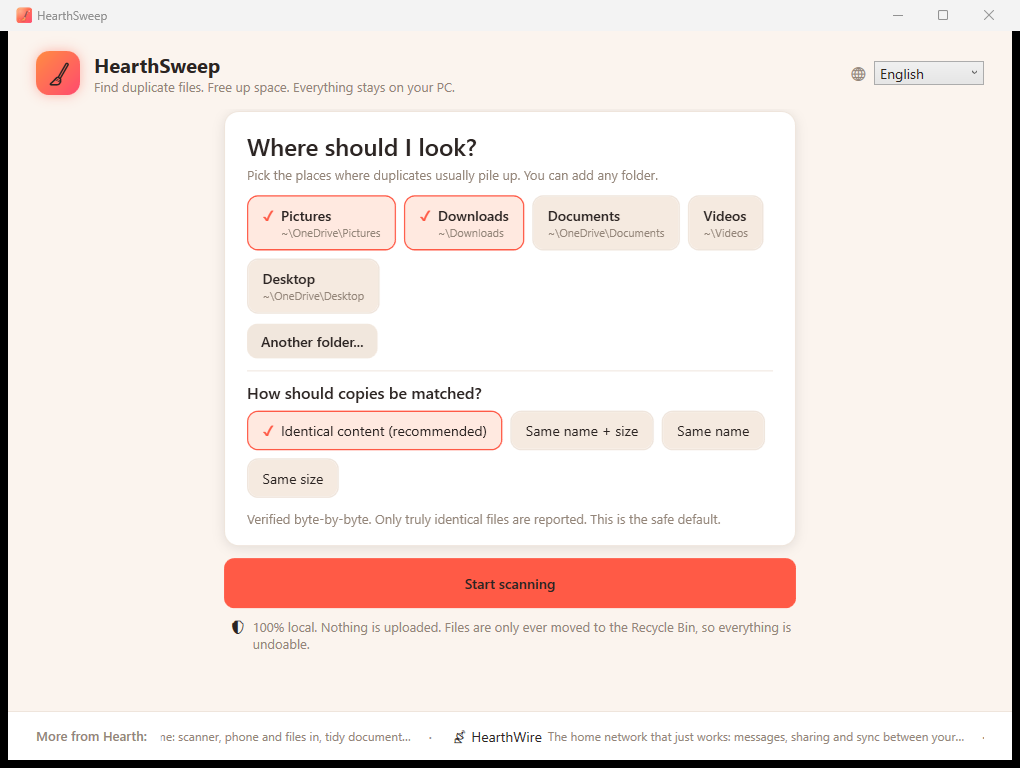
Honest by design
The default mode confirms every match with a full content check. If HearthSweep calls two files duplicates, they are identical, never a guess.
Identical content, same name + size, same name, or same size. Find the same song in two folders even when the versions differ, a mode most tools simply don't have.
HearthSweep never permanently deletes. Everything you sweep lands in the Recycle Bin, and one copy of every file is always kept, the app won't let you remove them all.
"Sweep all duplicates" keeps the newest copy of every group and clears the rest, thousands of files in one confirmed click, with live progress.
Image previews, per-file paths, dates and sizes, and smart selection: keep the newest, keep the oldest, or pick by hand.
No account, no analytics, no cloud. Your files and even their names never leave your computer.
Questions people ask
What is HearthSweep?
HearthSweep is a free duplicate file finder for Windows. You point it at the folders you want to check, it finds identical copies, and it clears the extras safely so you get the wasted space back.
Is HearthSweep free? Do I need an account?
Yes, HearthSweep is completely free from the Microsoft Store, with no account and no sign-up. There is no trial timer and no paid tier hiding the useful features.
Does HearthSweep work offline, or does it upload my files?
It runs entirely on your PC and works fully offline. Nothing is uploaded, no cloud is involved, and your files and even their names never leave your computer.
Which version of Windows do I need?
HearthSweep runs on Windows 10 and Windows 11. You install it straight from the Microsoft Store, so updates arrive automatically.
How does HearthSweep know two files are really duplicates?
The default mode compares files byte by byte, reading the full contents of each one. If HearthSweep marks two files as duplicates, they are genuinely identical, never a guess based on the name alone.
Can it find copies that are not byte-identical, like the same song saved twice?
Yes. Besides exact content matching, HearthSweep offers three more modes: same name and size, same name, or same size. That lets you catch the same song or photo in two folders even when the versions differ, something many tools cannot do.
Could HearthSweep delete a file I wanted to keep?
Everything you sweep goes to the Recycle Bin, never a permanent delete, so any removal is undoable. The app also always keeps at least one copy of every file and will not let you remove the last one.
HearthVault backs up your home PCs to each other, privately, with no cloud. From the same family.