See what your documents are carrying.
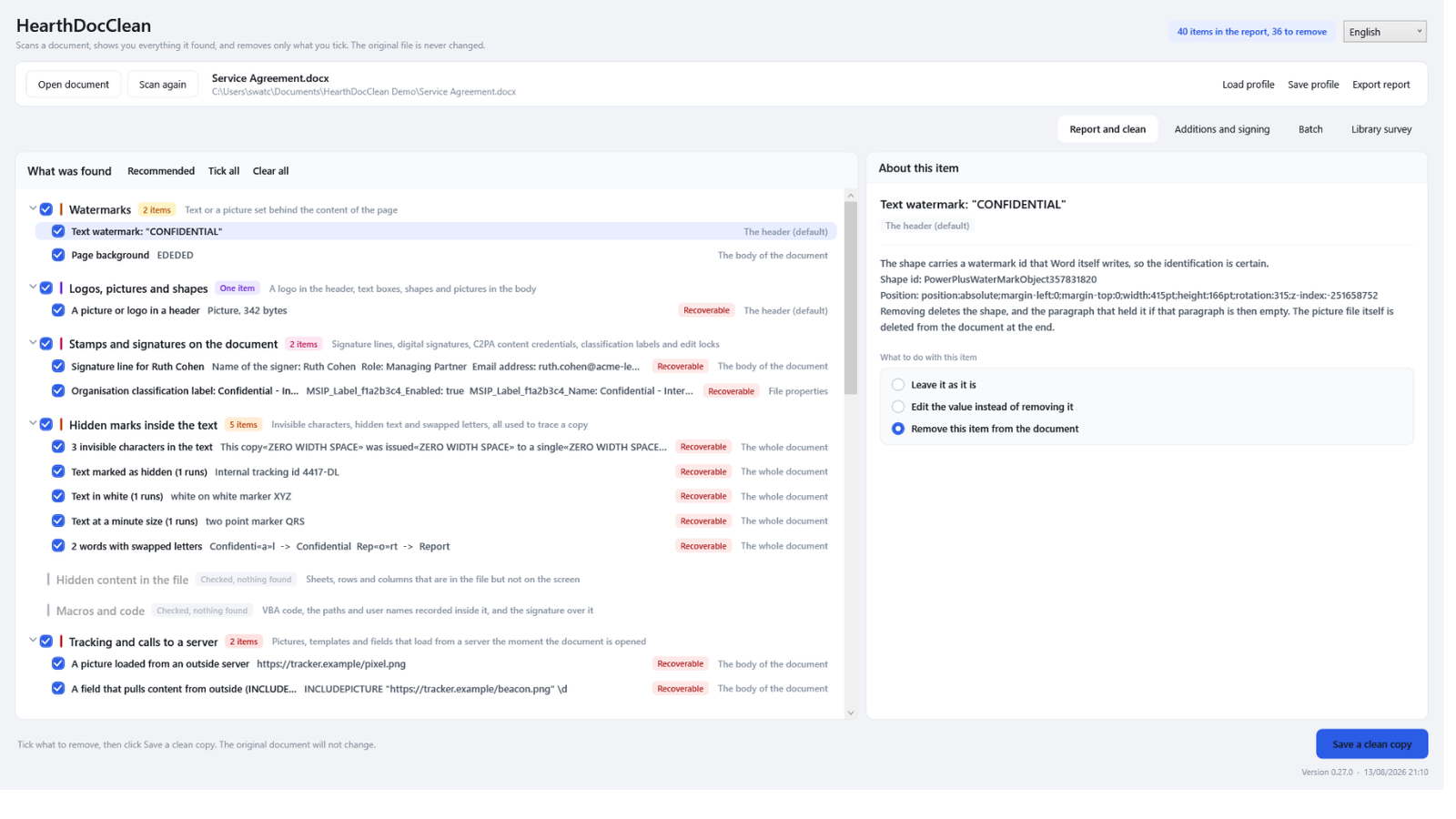
A document carries more than what is printed on it. The name of whoever wrote it, the firm that licensed the template, tracked changes somebody thought were accepted, a watermark that is still recoverable, the coordinates of the photograph you pasted in. HearthDocClean shows you all of it, then removes only what you tick.
You cannot remove what nobody told you was there.
Every other tool starts from the assumption that you already know what to take out. This one starts by telling you.
1. It scans
Open a document and the full report appears at once: every category, what was found in it, and the actual value next to each item. Nothing is written yet.
2. You decide
Every item offers keep, edit or remove. An author usually needs to become the firm's name rather than nothing. Hidden text is worth reading before deleting.
3. It writes a copy
The original file is never changed. The clean copy is scanned again afterwards, so you see what is left rather than take our word for it.
Not a shredder. A conversation.
Most metadata tools have one button and it says "strip everything". That is the wrong shape for real work. The author of a contract usually needs to become the firm's name. A logo needs to become a different logo. A watermark that says DRAFT needs to say FINAL.
So every finding offers all three, and tells you plainly what each one will do. Nothing is removed by default if removing it could change how the document legitimately looks or reads.
The report also lists what was checked and came back clean, so you can tell "there is nothing here" from "this was never looked at". And it lists only checks that apply: a photograph is not reported as free of macros.
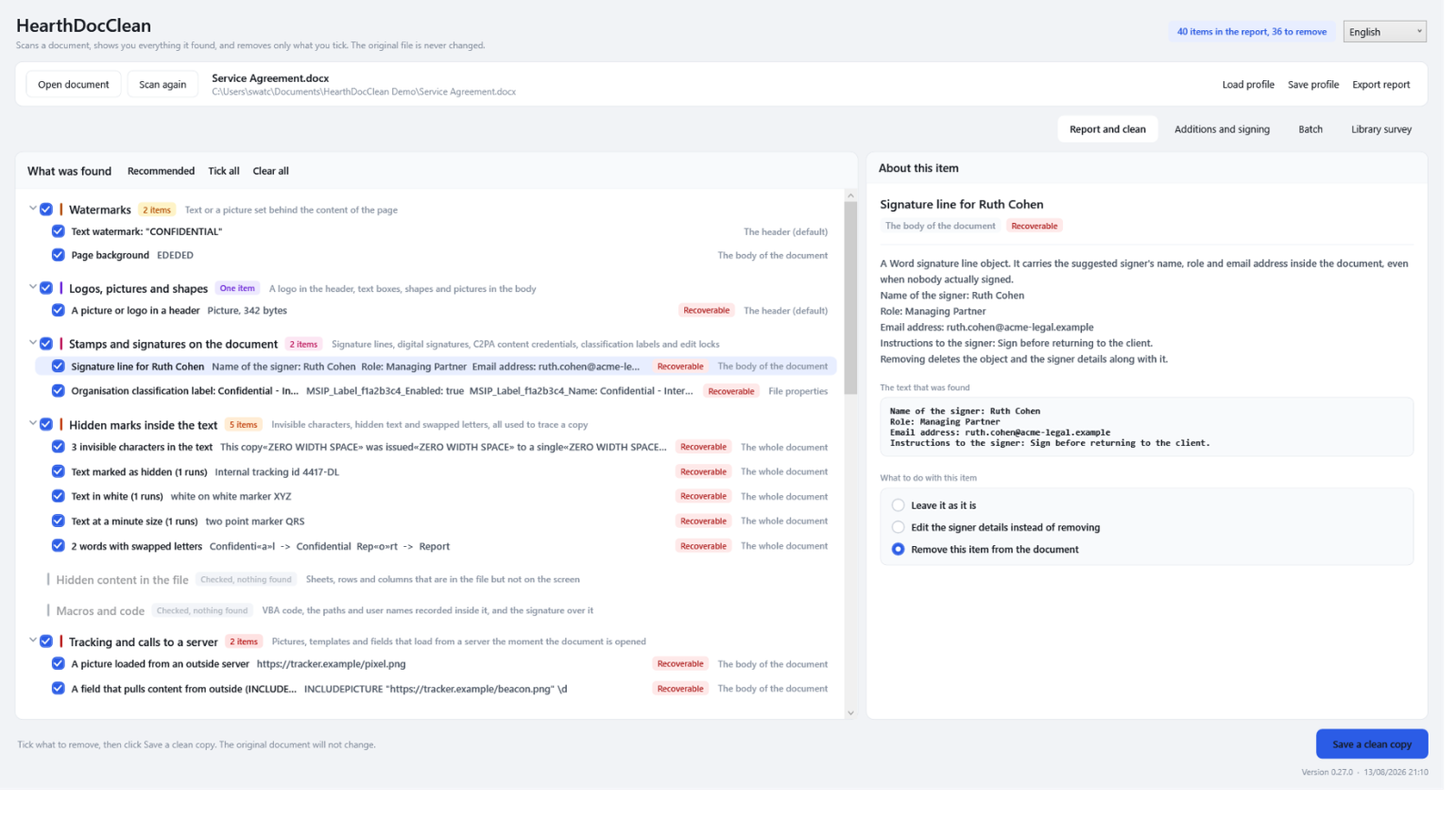
Sixty-seven kinds of hidden information.
Measured by running the scanner over a corpus that carries one of everything, not counted by hand from a feature list.
Watermarks and stamps
Text and picture watermarks, page backgrounds, logos in headers, floating shapes over the page, and the picture file itself, not just the reference to it.
Marks that identify your copy
Zero-width characters scattered between words, text in white on white, text at two points, Cyrillic letters standing in for Latin ones. This is how a leak is traced to one recipient, and no metadata cleaner touches it.
What survives after you think it is gone
Tracked changes somebody thought were accepted, the thumbnail that still shows the removed watermark, earlier revisions of a PDF sitting inside the bytes.
Pictures and templates that call out
An image loaded from a URL is a read receipt: it reports when the document was opened and from which network. Cut the link and keep the picture.
Hidden sheets, rows and columns
Including a sheet marked veryHidden, which Excel will not even offer to unhide, and content parked thousands of rows down where scrolling never reaches.
Inside the fonts and the macros
The foundry signature and licence buried in an embedded font file, scrubbed while the letters stay exactly as they are. The machine paths recorded inside a macro project.
Cleaning the copy inside the contract is half the job.
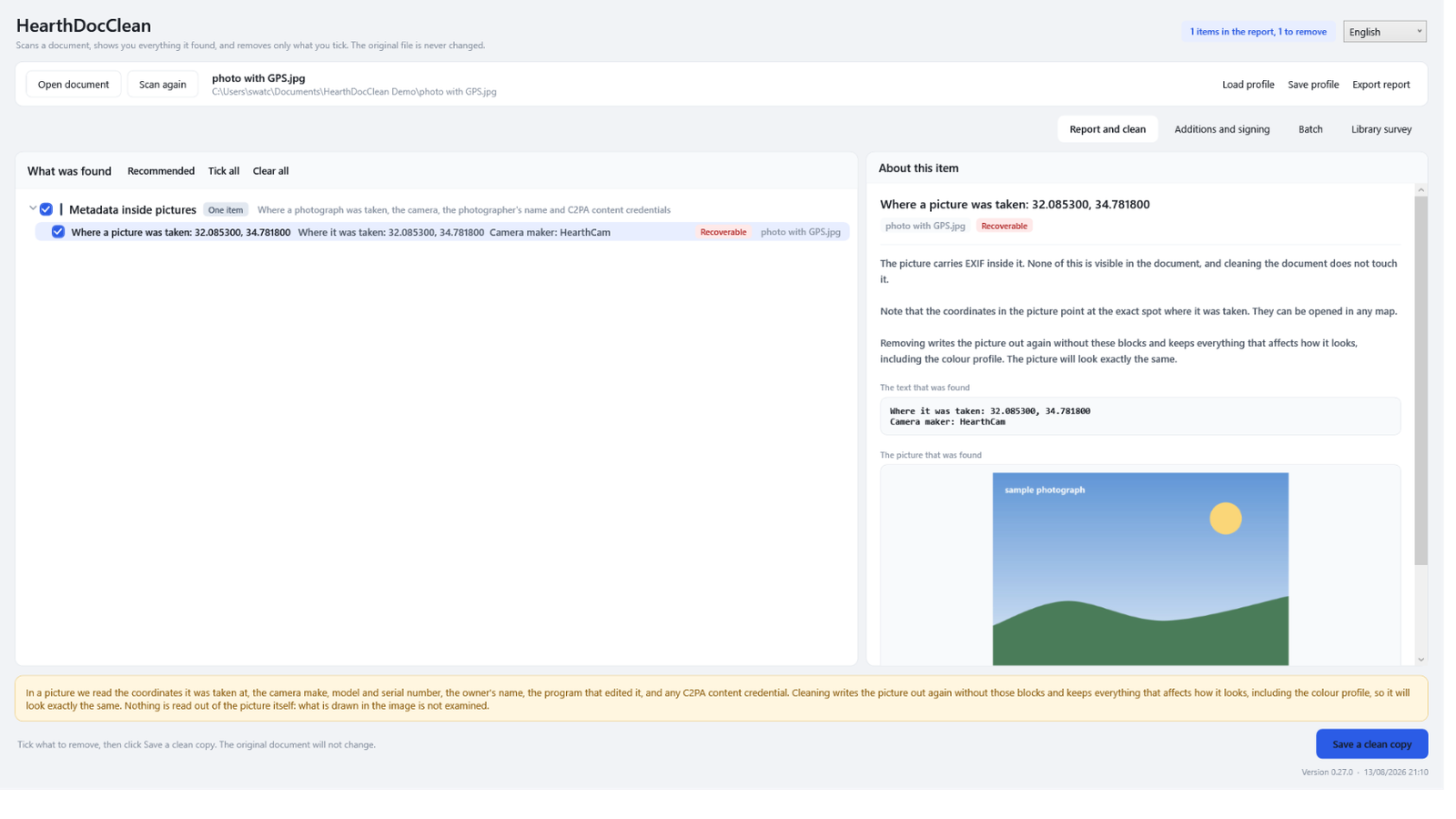
If a photograph inside your document carries the coordinates of where it was taken, so does the original sitting in your pictures folder. Clean one and email the other, and you have not gained anything.
So JPEG, PNG, WebP and GIF open on their own too. The same reader, the same report, the same choice. The picture is written out again without the coordinates, the camera serial number and the owner's name, and with everything that affects how it looks, including the colour profile. It looks exactly the same.
A folder, or a whole library.
Save a profile
Make the decisions once, save them, and apply the same profile to every document in a folder. Profiles travel between documents because they are keyed on the kind of finding.
Survey a library
Point it at a folder and see what is in every file, without writing, deleting or changing anything at all. Filter by the kind of finding and open any document from the list.
Add, then sign
Put your own watermark or signature line on the clean copy, and sign it with your certificate, with a trusted timestamp so it stays verifiable after the certificate expires.
Already have HearthPage?
They do different things and they work well together. HearthPage is the PDF workbench: you know what you want to do to a PDF, and you merge, fill, sign, black out and shrink it. HearthDocClean comes first, on any format, and answers a question you have not asked yet: what is in this file that I do not know about?
One network connection, and it is optional.
Everything happens on your computer. There is no account, no analytics and no upload.
The one exception, stated plainly
If you ask for a trusted timestamp on a digital signature, a cryptographic hash of that signature goes to the timestamp authority you chose. The document, its name, its contents and its size are never sent. If you do not use that feature, the app makes no network connection at all.
Your draft went somewhere, and it came back stamped.
Paste a contract into a cloud assistant and two separate things happen. The text leaves your building, which is a decision your firm may or may not have taken deliberately. And what comes back is often marked: the tool's name written into the document properties, a signed C2PA manifest naming the model, an IPTC field recording that a model produced the picture. Those are stored values, so HearthDocClean shows you every one of them and removes the ones you tick.
Running a model on your own machine removes the first problem outright. Nothing is sent, so nothing can be retained, logged or learned from. One distinction is worth knowing: an open model running on your PC and the same company's hosted service are not the same answer, because the statistical watermark in text is applied while the text is being generated, by whoever is running the model. Run it yourself and there is nobody applying one.
It does not leave you with a clean file, though. Your editor still signs its work. Word records the author, the picture tool records what made the picture, the template remembers the firm it was licensed to, and the photograph you pasted in still knows where it was taken. That is what this program is for, whichever way the document was drafted.
The things worth knowing first.
Which files does it work on?
Word, Excel, PowerPoint and PDF, twenty-two extensions in all including the template and macro variants, plus JPEG, PNG, WebP and GIF photographs on their own. The old binary formats (.doc, .xls, .ppt) are recognised and refused with a message telling you to resave them, rather than failing with an unhelpful error.
Will it damage my file?
Your original is never written to. The clean copy goes to a new file, and it is opened and scanned again afterwards so you can see what is actually left in it. For a PDF the page count is compared before and after, and you are warned loudly if anything does not match.
Does removing something leave a trace?
No, and that is deliberate. Nothing removed leaves a marker, an empty placeholder or a note that something used to be there. That is the difference between cleaning a document and annotating it.
How is this different from redacting in a PDF editor?
Drawing a black rectangle over text removes nothing: the characters are still underneath and can be selected and copied. When HearthDocClean removes text from a PDF page it deletes the characters from the drawing instructions and puts back the width they occupied, so everything else stays exactly where it was.
Does it remove AI watermarks, like Google SynthID?
Partly, and the honest answer is worth the paragraph, because two very different things get called the same name.
The part that is written down, yes. When a picture or a document records how it came to exist, that is a stored value and HearthDocClean finds it and removes it if you tick it. That covers C2PA Content Credentials, the signed manifest that Adobe, Leica and the big image models attach, in documents and in pictures alike. It also covers the IPTC field DigitalSourceType, whose value trainedAlgorithmicMedia is the standard way of writing down "a model made this". And it covers the whole EXIF, XMP and IPTC block around them, including whichever program stamped its own name in there.
The part that is not written down, no, and no tool of this kind can. SynthID for text is not stored anywhere in the file. It is a property of which words the model chose: the system biases the choice of each word using a key, and detection re-derives that from the key and the sequence and runs a statistical test. There is no field to strip and no character to delete. The only way to weaken it is to rewrite the text, which is exactly what this program refuses to do to your content. SynthID for images, audio and video is the same story one layer down: it lives in the pixels and in the sound, survives cropping, resizing and re-compression, and is not metadata either.
We would rather say that plainly than claim otherwise. The whole point of the report is that it separates "checked, and there is nothing" from "this was never looked at". Adding a line that said your file was clean of something we never examined would be the one thing this program is built not to do.
Does it need the internet or an account?
No account, and no internet except for one optional feature: fetching a trusted timestamp for a signature you asked for. Nothing else in the app touches the network.
What does it cost?
A one-time purchase on the Microsoft Store. No subscription, no trial that expires, and no features held back for a higher tier.
Which languages does it speak?
English, Hebrew and German, with a full right-to-left layout in Hebrew. Your choice is remembered between runs.
Part of the Hearth family
Small Windows apps that each do one job for your household, fully offline, and play nicely with each other. No cloud, no accounts, no subscriptions.